For decades, software testing relied on a single truth: same input, same output, every single time. You wrote an assertion, it passed or failed, and the result meant something.
Generative AI broke that truth. Ask an LLM-powered feature the same question twice and you may get two different answers, not wrong, not right, just… different.
This post is the long-form companion to my talk, Testing the Untestable: Building a strategy for testing AI.
It’s meant to stand alone, so if you aren’t able to see the talk, you can still use it to help understand the foundations of what is needed to build a testing strategy for an AI product. If you’re here because you have seen the talk, consider it post-talk reference material.
The core problem
Deterministic testing works because of three assumptions:
You control the input.
You know the expected output in advance.
A test that passes today will pass tomorrow if nothing changed.
AI systems weaken all three. Users supplied inputs don’t fit what you expected. Many different outputs can be correct. And the same input can produce different results run to run, even when nothing in the underlying codebase changed.
With AI powered products, 100% ceratainty is not possible. This means that
Testing AI isn’t about being sure there is no risk.
It is about creating confidence that the level of risk is low enough to be acceptable.
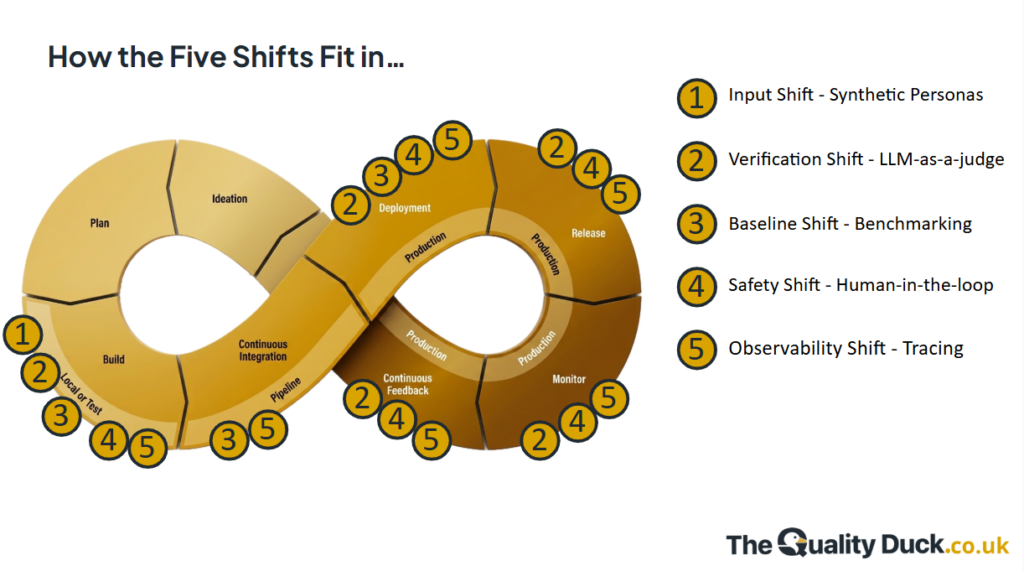
To achieve this we need a shift in thinking for how we test, we need the five shifts of testing AI.
In a deterministic system, input is structured. With an AI chat interface, real users type what they want, and they are creative. They paste in whole emails, misspell things, ask two questions at once, get frustrated, switch topic halfway through, use a mixture of languages, and probe the edges out of curiosity. A few dozen hand-written prompts only cover what you thought of, and not what your users might actually do.
The technique
First we borrow the idea of personas from exploratory testing. We build a suite of different personas that represent different elements of our user base. We use those personas to build automated presona driven testing. This takes our well-defined personas and uses them to guide an LLM to act like those users. On top of that, you feed the persona a goal and set it run against your chat interface until it achieves its goal, or x turns have completed.
Running tests like this allows you to generate hundreds, or thousands of conversations to test how your product behaves. You can also do it across as many personas and goals as you like. Ultimately creating your a useful pre-production set of conversations that you can review to understand how your product behaves against something close to real conversations.
A useful persona definition includes:
Context: what they know, what they’ve already tried, what state they’re in
Style: vocabulary, tone, verbosity, typos, language
Behaviour: patient or impatient, cooperative or uncooperative, sticks to one topic or wanders
Constraints: what they don’t know or won’t say
Goal: what they’re trying to achieve, in their own terms
Making it work
Cover the space deliberately. List the dimensions that matter for your product (user type, task, difficulty, tone, language) and combine them systematically rather than hoping randomness covers it.
Include the awkward personas. The confused newcomer, the expert who over-specifies, the person who’s angry, the person who gives you half the information. These find far more than the happy path.
Seed with reality where you can. If you have real user inputs, use them to shape personas. Synthetic data drifts towards what an LLM finds typical, which is more polite and more coherent than actual people.
Review a sample by hand. Read what your generator produces. If it all sounds like the same well-mannered assistant in a different hat, your coverage is thinner than it looks.
Regenerate freely. Since the product changes, so should the inputs. Treat them as cheap and disposable, and keep the personas as the durable asset.
Limits
Synthetic inputs are a supplement to real ones, not a replacement. They can’t tell you what users actually do, only what a model thinks users might do. That gap is one of the reasons the observability shift matters.
2. The Verification Shift: LLM-as-a-judge
The problem
When there are hundreds or thousands of conversations to review, how can you do it quickly and efficiently? and when there are many correct answers, you can’t compare against just one. You need to evaluate the output against criteria: is it accurate, grounded, on-topic, appropriately toned?
The technique
LLM-as-a-judge uses a model to grade another model’s output against a rubric you write. You give the judge the input, the output, any relevant context (such as the source documents the answer should be grounded in) and the criteria, and it returns a verdict and reasoning.
The strengths are scale and flexibility. Scale is obvious: nobody can read every response. Flexibility is the underrated one. Static evaluations have their place, but a fixed dataset of 2,000 expected outputs is expensive to build and expensive to change. When your product changes, or you change your mind about what “good” means, you can rewrite a judge in an afternoon.
Designing a judge
Some practices that consistently help:
One judge, one criterion. A judge asked to assess accuracy, tone, completeness and relevance at once gives muddy results. Split them.
Prefer narrow, checkable questions. “Does the answer make any claim not supported by the provided context?” beats “Is this a good answer?”
Use simple scales or binary verdicts. A pass/fail with a defined threshold is easier to calibrate than a score out of ten. If you need gradations, define what each level means with examples.
Ask for reasoning before the verdict. Having the judge explain first tends to produce better verdicts, and the explanation is what you read when debugging.
Return structured output. Ask for JSON so you can aggregate results without parsing prose.
Give it the ground truth it needs. A judge can’t check a fact it hasn’t been given. For groundedness, pass in the relevant context.
Keep generation settings stable. Low temperature reduces judge variance, though it won’t eliminate it.
A skeleton to adapt:
You are evaluating an AI assistant's answer for GROUNDEDNESS.

Context provided to the assistant:
{context}

User question:
{question}

Assistant answer:
{answer}

Task: Identify every factual claim in the answer. For each, decide
whether it is supported by the context.

Respond in JSON:
{
  "claims": [{"claim": "...", "supported": true/false, "evidence": "..."}],
  "verdict": "pass" | "fail",
  "reasoning": "..."
}

Fail if any material claim is unsupported.
Known judge biases
Judges are models, and they have habits. The well-documented ones:
Verbosity bias: longer answers tend to score higher.
Position bias: in side-by-side comparisons, the answer shown first can be favoured.
Self-preference: a model can rate outputs from its own family more generously.
Sycophancy to confident tone: fluent, assertive answers look better than hedged correct ones.
Mitigations include swapping positions and averaging, using a different model family from the one under test, and writing rubrics that explicitly penalise padding.
Calibrating against humans
This is the step people skip. A judge is only useful if it agrees with the people whose opinion you care about.
Have humans label a sample of outputs against the same rubric.
Run the judge on the same sample.
Measure agreement, and read the disagreements. They can reveal an ambiguous rubric or a poorly configured judge.
Adjust, rerun, repeat until the judge is trustworthy for that criterion.
Recheck periodically, particularly when the model, prompt or product changes.
Treat the judge as a piece of software under test. It needs its own quality checks.
3. The Safety Shift: human-in-the-loop
The problem
Judges and benchmarks give you scale, but neither is accountable for the outcome. However, a judge can be wrong in ways that look right, and a benchmark only knows about the cases you put in it. Some outputs, such as advice a customer will act on or anything with legal, financial or safety consequences, need human taste and human judgement before you’re willing to stand behind them.
So the safety net is people. The design question is how much and where.
Deciding how often humans look
Reviewing every response doesn’t scale. But reviewing none is reckless. So how do you decide what people should be looking at? My starting point would look something like:
Humans review 100% of issues flagged by a judge
Humans review a random sampling of conversations judged as ok by a judge
As even judges don’t scale to 100% of traffic, mostly due to costs, humans should also review a random smapling of conversations not reviewed by a judge.
Targetted reviews of conversations flagged by deterministic systems for review, such as high number of turns, etc.
Frequency isn’t fixed. Start higher while you’re learning how the system behaves, and relax it as evidence builds that it’s safe to. If a change lands (new model, new prompt, new feature), turn it back up.
What humans are doing
Reviewers do more than approve or reject:
Judging what automation can’t: tone, appropriateness, whether the answer is actually useful to the person asking, whether it’s what the business wants said.
Providing ground truth for your judges. Their verdicts are what you calibrate against, so people and judges keep each other honest.
Feeding the datasets. A reviewer who spots a bad answer has just written a new test case. Make it easy to promote it into your persona driven testing and your golden dataset – more on golden datasets in the next shift.
Spotting the unknown unknowns. A judge only checks the criteria you wrote. A human reads an answer and says “that’s not right”, for reasons you hadn’t thought to define.
Making review work in practice
Put everything in one place. Show the input, the output, the relevant sources and the judge’s reasoning together. If reviewers have to dig for context, they’ll skim.
Give clear guidance. Reviewers need to know what “good” looks like, ideally with examples, or you’ll get inconsistent verdicts.
Check the reviewers too. Have more than one person review a sample and see how often they agree.
Protect their attention. Reviewing similar outputs for hours dulls anyone. Sample sensibly, rotate people, and keep sessions short.
Be clear who owns the decision. Someone needs to be accountable for the call that the risk is acceptable.
4. The Baseline Shift: benchmarking
The problem
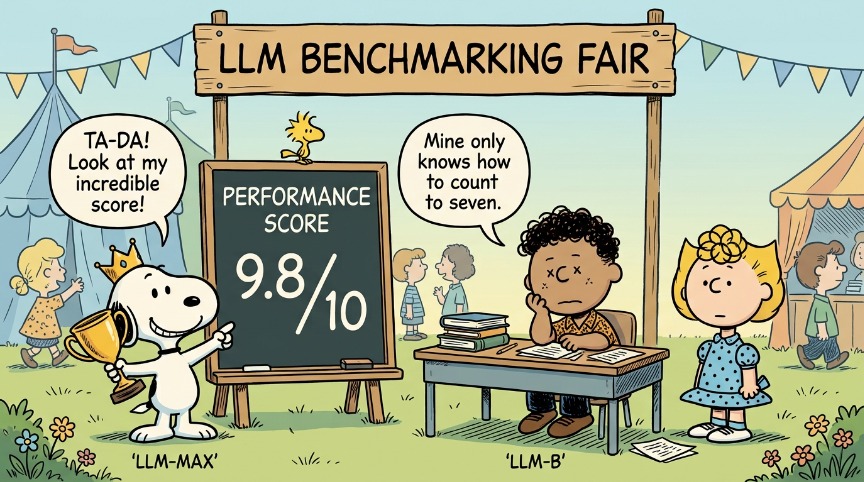
If you can’t define “correct” for a single response, how do you know whether a change improved things? Swapping a model, editing a prompt or changing your retrieval can each make some answers better and others worse, and you won’t see it by eyeballing a few examples.
The technique
Measure against a baseline. The central asset is a golden dataset: a curated set of inputs, each with the expected behaviour or reference answer that your team has agreed represents good. You run the system against it, score the results (with code, judges, humans, or a mix) and get numbers you can compare release over release.
Building a golden dataset
Start from real usage where possible. Production traces, support tickets and user feedback give you inputs you wouldn’t invent.
Add expert-authored cases. Have domain experts write or approve the hard cases and the reference answers.
Cover the categories that matter. Core tasks, edge cases, known past failures and out-of-scope requests. Tag each case so you can slice results (for instance, accuracy by category).
Turn every serious failure into a test. When production goes wrong, the failing input joins the dataset. Over time, the dataset becomes a record of what has hurt you.
Version it. Datasets change. Track versions so you know whether a score moved because the system changed or the benchmark did.
Keep some cases held out. If you tune prompts against the whole dataset, you’ll overfit to it. Hold back a portion you only run for verification.
Keep it a size you can afford. Bigger isn’t automatically better. A few hundred well-chosen cases that you trust beat thousands you don’t.
Handling non-determinism in the numbers
Because outputs vary, a single run of a single case tells you little.
Run cases multiple times where variance matters, and look at pass rates instead of single results.
Compare distributions, not points. A one-point movement in an aggregate score may be noise. Have a sense of your run-to-run variation before you set a threshold.
Set thresholds by risk. A 95% pass rate might be fine for tone and unacceptable for a criterion where a wrong answer causes real harm, where you may want to inspect every failure.
Gate releases on regressions. Fail the pipeline if key metrics fall below agreed levels, the same way you would with any other quality gate.
The side product
The main product of all this is confidence. The side product is data. Every evaluation run, every human verdict and every strange failure adds to a growing body of test and evaluation data that you can use to build better evals, tune judges, and improve the system itself. It’s a good reason to store results properly instead of treating each run as disposable.
5. The Observability Shift: tracing
The problem
Pre-release testing has a ceiling. You will never see the full range of real usage until real users arrive, and behaviour can change after release (model updates, new data, changed usage patterns). So some of your testing has to move into production.
The technique
Tracing captures what happened inside a request end to end: the user input, the prompt as finally assembled, what was retrieved, each model call, each tool call and result, and the final output, plus timings, token counts and cost. When something goes wrong, you can see why, not just that it did.
What to capture
The full chain of steps for each request, as connected spans
Prompt and model versions, so you can tie behaviour to changes
Retrieved context and its sources
Tool calls, with inputs and outputs
Latency, token usage and cost
User feedback (ratings, edits, abandonment) attached to the trace
Evaluation scores, where you run them online
OpenTelemetry has emerging conventions for generative AI, and tools such as Langfuse, LangSmith and Arize Phoenix are built around this. Pick what fits your stack. The principle matters more than the product.
What tracing enables
Debugging: find where in the chain a bad answer came from.
Online evaluation: run judges over a sample of live traffic to track quality as it happens, and alert when it moves.
Dataset growth: promote interesting or failing traces into your golden dataset.
Review queues: route flagged traces to human reviewers.
Drift detection: see when behaviour or usage shifts before customers tell you.
Handle data responsibly
Traces contain user input, which may contain personal or confidential data. Decide up front what you redact, how long you retain traces, who can see them, and what your legal position is. This is part of the design, not a later bolt-on.
How the shifts fit your existing models
None of this replaces the testing models you already use. It plugs into them:
Shift-left, from Larry Smith’s Shift-Left Testing: personas and early evals move quality thinking to the start.
Continuous testing, from Dan Ashby: benchmarks and judges run in your pipeline; tracing and online evals continue after release.
Holistic testing, from Janet Gregory, and the extended version we built at Houseful, described here: quality activities across the entire lifecycle, which is exactly where the five shifts land.
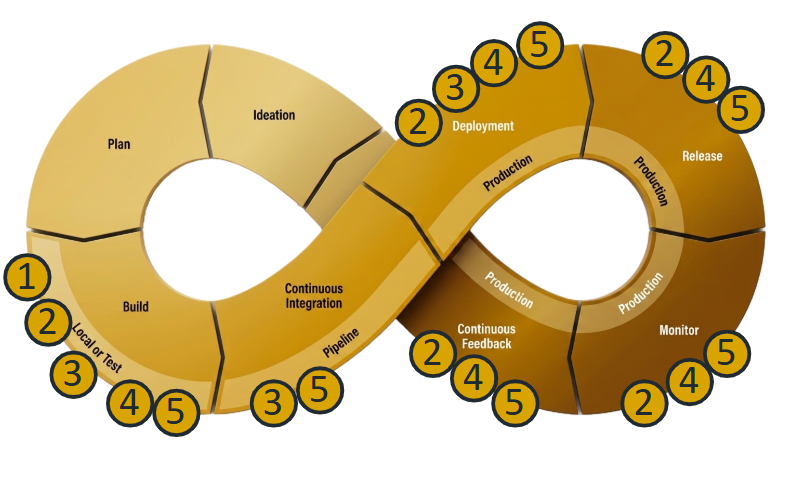
The five shifts fit across your software development lifecycle, with most being relevant at more than one step.
Where to start
You don’t need all five at once. A sensible order for most teams:
Tracing first. You can’t improve what you can’t see, and traces feed everything else.
A small golden dataset. Fifty to a hundred cases from real usage, reviewed by someone who knows the domain. Get a baseline number.
One or two judges on the criteria that matter most, calibrated against human labels.
A risk-based human review policy, written down.
Synthetic personas to broaden coverage once you know where the gaps are.
Release gates and online evaluation once your metrics are trusted.
Adjust for your product’s risk. A customer-facing assistant handling sensitive topics should put human review earlier. An internal summarisation tool can start lighter.
Confidence, not certainty
Every product we’ve ever shipped carried risk. We just used to be able to hide it behind green ticks.
With AI, the honest position is that you can’t prove the absence of bad behaviour. What you can do is build layered evidence: varied inputs, calibrated judges, measured baselines, humans checking what matters, and eyes on production. Enough of that, and you can make a reasoned decision that the risk is low enough to accept. That decision, and who owns it, is a leadership conversation as much as a testing one.
 uality Duck